使用IDEA中的Maven打包是一个很频繁的操作,在多模块下Maven打包流程就会变得有些复杂,我们就来浅分析一下其中涉及的机制。
多模块打包方式有三种:
- 一键打包(多模块批量打包)
- 逐步打包(单模块多次打包)
- 混合打包(部分多次,部分批量)
当然我们推荐一键打包,毕竟更加智能快捷~,有利于CI/CD一键部署。
结论先行:一键打包先clean再package
1.准备模块
读者无需准备啦,有个项目框架往下看就行啦~本文根据项目框架来进行讲解
首先我们准备模块设计如下:
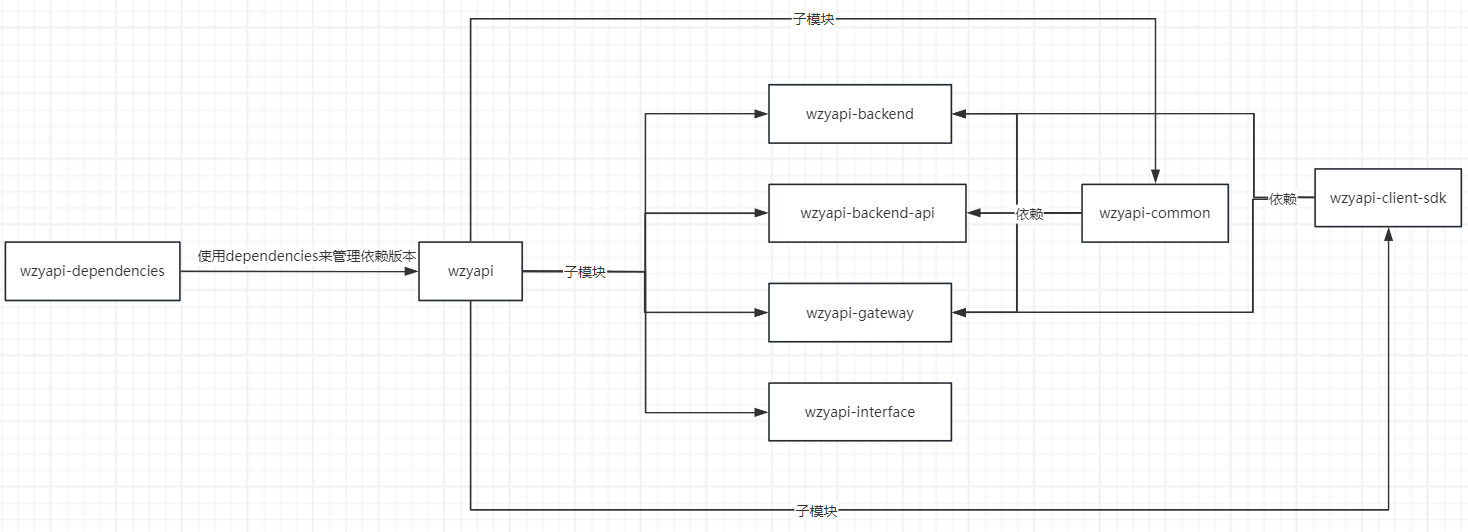
具体工程目录如下:
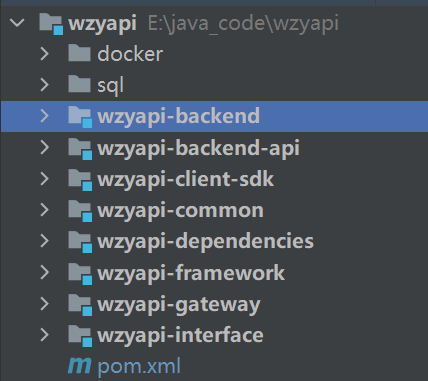
后续我们采用打包方式为:直接通过根目录一键打包所有模块,采用的插件是spring-boot-maven-plugin来打包各个子boot项目。且直接在idea中生成jar包,不将任何子模块install到本地Maven仓库中,以避免本地mven仓库冗余我们自己编写的代码,直接存在idea的target目录就足够了。
2.编写pom文件内容
在父模块wzyapi引入modules标签。以控制maven需要编译打包的子模块。没有引入modules的模块不会被编译打包。如果你部分模块想直接使用本地仓库的,而不使用idea中编写的就不要引入到modules中。
例如本地仓库有wzyapi-common完整模块代码了,即使idea中改动了我也不想用,我就要用本地代码,那么modules标签中一定不要包含wzyapi-common模块,让maven自己在本地寻找依赖,否则你打包出来的永远是idea中代码编译出来的依赖。
1
2
3
4
5
6
7
8
9
10
11
12
| <modules>
<module>wzyapi-dependencies</module>
<module>wzyapi-common</module>
<module>wzyapi-client-sdk</module>
<module>wzyapi-framework</module>
<module>wzyapi-backend-api</module>
<module>wzyapi-interface</module>
<module>wzyapi-gateway</module>
<module>wzyapi-backend</module>
</modules>
|
以上我们实现了一个小功能,控制maven需要囊括编译的模块,和控制不需要囊括编译的模块(即不在modules中声明),或者说控制maven使用本地仓库代码的模块。
当然我们可以写一个模块install一个模块,来多次编译获取最新的jar包,这样就与单模块编写代码无异,这样虽然同步性强但人工操作就急剧增多,不智能^^。这种打包方式我称为逐步打包/单模块打包。
既然逐步部署同步性强,那么一键部署就会同步性较差,如果不注意就会导致代码未同步到jar包中。
先行结论,如果要保证一键部署的强同步性,在每次打包时建议先clean再打包。
2.1父模块pom
父模块完整pom.xml文件内容如下:
1
2
3
4
5
6
7
8
9
10
11
12
13
14
15
16
17
18
19
20
21
22
23
24
25
26
27
28
29
30
31
32
33
34
35
36
37
38
39
40
41
42
43
44
45
46
47
48
49
50
51
52
53
54
55
56
57
58
59
60
61
62
63
64
65
66
| <?xml version="1.0" encoding="UTF-8"?>
<project xmlns="http://maven.apache.org/POM/4.0.0"
xmlns:xsi="http://www.w3.org/2001/XMLSchema-instance"
xsi:schemaLocation="http://maven.apache.org/POM/4.0.0 http://maven.apache.org/xsd/maven-4.0.0.xsd">
<modelVersion>4.0.0</modelVersion>
<groupId>com.wzy</groupId>
<artifactId>wzyapi</artifactId>
<version>0.0.1</version>
<packaging>pom</packaging>
<name>wzyapi</name>
<description>一个面向开发者的api开放平台</description>
<properties>
<reversion>0.0.1-SNAPSHOT</reversion>
<maven-compiler-plugin.version>3.8.1</maven-compiler-plugin.version>
<spring-boot-maven-plugin.version>2.7.6</spring-boot-maven-plugin.version>
</properties>
<modules>
    <module>wzyapi-dependencies</module>
    <module>wzyapi-common</module>
    <module>wzyapi-client-sdk</module>

    <module>wzyapi-framework</module>
    <module>wzyapi-backend-api</module>

    <module>wzyapi-interface</module>
    <module>wzyapi-gateway</module>
    <module>wzyapi-backend</module>
</modules>
<dependencyManagement>
<dependencies>
<dependency>
<groupId>com.wzy</groupId>
<artifactId>wzyapi-dependencies</artifactId>
<version>0.0.1</version>
<type>pom</type>
<scope>import</scope>
</dependency>
</dependencies>
</dependencyManagement>
<build>
<pluginManagement>
<plugins>
<plugin>
<groupId>org.apache.maven.plugins</groupId>
<artifactId>maven-compiler-plugin</artifactId>
<version>${maven-compiler-plugin.version}</version>
</plugin>
<plugin>
<groupId>org.springframework.boot</groupId>
<artifactId>spring-boot-maven-plugin</artifactId>
<version>${spring-boot-maven-plugin.version}</version>
</plugin>
</plugins>
</pluginManagement>
</build>
</project>
|
2.2子模块pom
1
2
3
4
5
6
7
8
9
10
11
12
13
14
15
16
17
18
19
20
21
22
23
24
25
26
27
28
29
30
31
32
33
34
35
36
37
38
39
40
41
42
43
44
45
46
47
48
49
50
51
52
53
54
55
56
57
58
59
60
61
62
63
64
65
66
67
68
69
70
71
72
73
74
75
76
77
78
79
80
81
82
| <?xml version="1.0" encoding="UTF-8"?>
<project xmlns="http://maven.apache.org/POM/4.0.0"
xmlns:xsi="http://www.w3.org/2001/XMLSchema-instance"
xsi:schemaLocation="http://maven.apache.org/POM/4.0.0 https://maven.apache.org/xsd/maven-4.0.0.xsd">
<parent>
<groupId>com.wzy</groupId>
<artifactId>wzyapi</artifactId>
<version>0.0.1</version>
</parent>
<modelVersion>4.0.0</modelVersion>
<artifactId>wzyapi-backend</artifactId>
<version>${reversion}</version>
<packaging>jar</packaging>
<name>wzyapi_backend</name>
<description>wzyapi开放平台的【api后台管理系统】</description>
<dependencies>
。。。省略了依赖。。。
</dependencies>
<build>
<plugins>
<!--war包打包插件 -->
<plugin>
<groupId>org.apache.maven.plugins</groupId>
<artifactId>maven-compiler-plugin</artifactId>
<configuration>
<source>1.8</source>
<target>1.8</target>
<encoding>UTF-8</encoding>
</configuration>
</plugin>
<!--jar包打包插件-->
<plugin>
<groupId>org.springframework.boot</groupId>
<artifactId>spring-boot-maven-plugin</artifactId>
<configuration>
<mainClass>com.wzy.project.MyApplication</mainClass>
<excludes>
<exclude>
<groupId>org.projectlombok</groupId>
<artifactId>lombok</artifactId>
</exclude>
</excludes>
</configuration>
<executions>
<execution>
<goals>
<goal>repackage</goal>
<goal>build-info</goal>
</goals>
</execution>
</executions>
</plugin>
<!--git属性文件生成插件-->
<plugin>
<groupId>pl.project13.maven</groupId>
<artifactId>git-commit-id-plugin</artifactId>
<executions>
<execution>
<goals>
<goal>revision</goal>
</goals>
</execution>
</executions>
<configuration>
<generateGitPropertiesFile>true</generateGitPropertiesFile>
</configuration>
</plugin>
</plugins>
<resources>
<resource>
<directory>src/main/resources</directory>
<!--开启过滤,用来指定的参数替换directory下的文件中的参数-->
<filtering>true</filtering>
</resource>
</resources>
</build>
</project>
|
2.3总结
1.父模块在 dependencyManagement 标签引入版本管理依赖 wzyapi-dependencies,这样就可以在父模块管理许多依赖的版本了。
但需要注意的是,在父模块引入 wzyapi-dependencies ,它内部的properties标签并不能传递,我们需要使用父模块来传递properties标签。即wzyapi-dependencies管理 dependencies中的依赖版本,父模块管理一些额外需要使用的properties标签。
2.子模块编写 dependencies 标签且无需版本号,定义子模块需要使用的依赖,一旦引入新的依赖就加到 wzyapi-dependencies 进行管理。
3.子模块编写 build 标签,定义打包需要的插件。对于boot模块即运行模块使用spring-boot-maven-plugin插件,对于jar模块和pom模块即无需启动的模块无需定义插件。
至此我们就可以实现一键打包了^^。
父模块依赖版本管理、插件版本管理;子模块定义依赖、定义插件。
父模块pom,子模块jar。
额外一个dependencies专门依赖版本管理模块为pom,并添加到父模块的dependencyManagement标签中。
3.一些问题
1.如果我们本地有某个模块的jar包,然后idea中也有某个模块的jar包,会优先使用哪个?
答案是:如果modules管理了这个模块,就优先idea中的jar包;如果modules没有管理这个模块就使用本地jar包。
2.如果我们更新B模块代码然后立即一键打包,那么依赖B模块的A模块jar包中能得到最新的B模块代码吗?
答案是:不能。至于为什么我还没有找到说法,估计是maven为了优化打包速度导致的,没有代码改变的模块明显打包速度更快,导致打包的代码是上次缓存的代码,即同步性差。这样的话我们clean一下同步性就好了,咱就是手动删除缓存呗。
我们进一步说明一下这个问题:
第一次打包
这是第一次打包项目时的耗时输出:
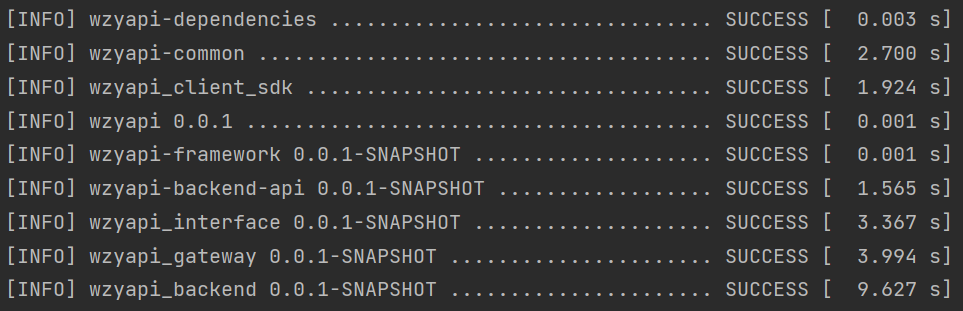
第一次backend模块打包:9 S左右,common模块2秒左右。
我们再查看一下backend模块依赖的common模块的jar包,内容如下:
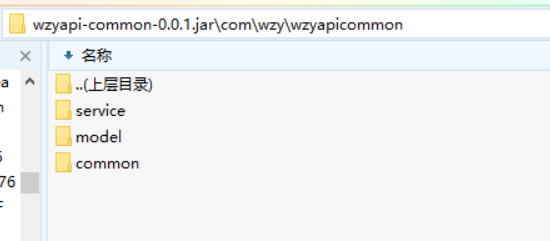
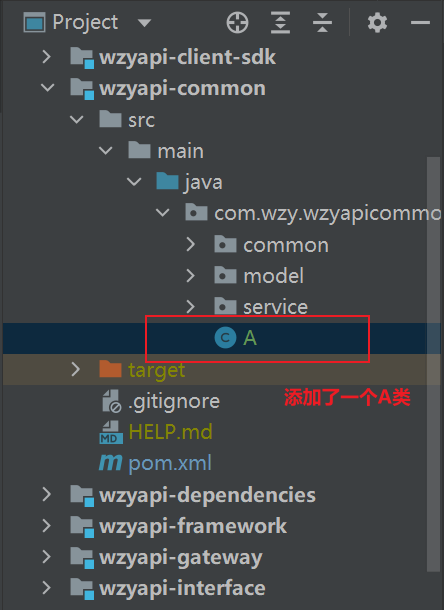
我们在IDEA更改一下common模块代码,然后立即再次打包package,且不进行clean(注意package不会包含clean操作的!!!网上有人误认子弟啊)。
第二次打包
这次我们只更改了common模块代码,其它模块会感应到变化更新打包内容吗?不会**
这是第二次打包项目时的耗时输出:
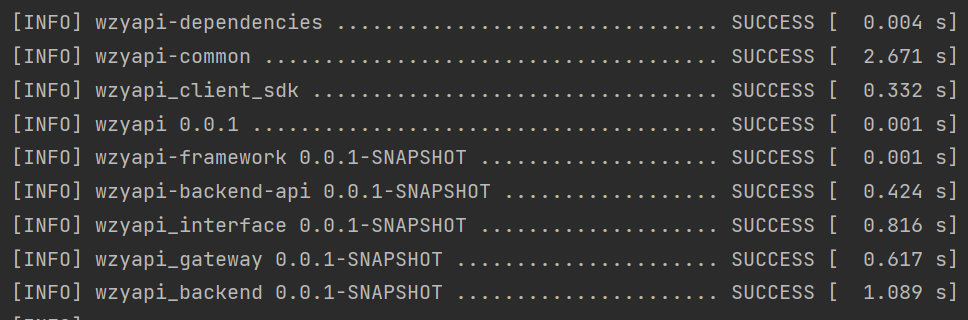
第二次backend模块打包:1 S左右,common模块2秒左右。
从时间上看也就知道了common模块代码变化了,打包时感应到了就完全重新打包;其它模块代码无变化,打包时就感应不到别的模块代码变化,就会缓存打包。即模块变化是隔离的,maven模块打包缓存清空是隔离的。
我们再查看一下backend模块依赖的common模块的jar包,内容如下:
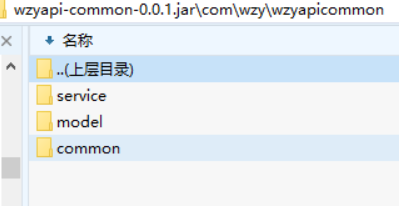
(⊙﹏⊙)代码没有变化。。。其它模块查看一下common的jar包同样如上图。
那么我们再查看一下common模块自己生成的jar包,内容如下:
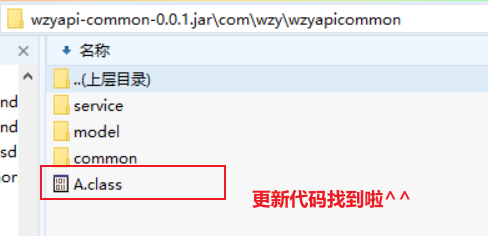
哇~找到了我们更新的代码
所以,听话先clean再package,避免缓存生效,确保java代码和jar包代码的同步性。
或者我们不用idea的按钮了,直接控制台 mvn clean install package ‘-Dmaven.test.skip=true’。当然这样我们需要手动输入还要记忆命令**
4.总结
- 父模块依赖版本管理、插件版本管理、子模块版本管理;子模块定义依赖、定义插件。父模块pom,子模块jar。额外一个dependencies专门依赖版本管理模块为pom,并添加到父模块的dependencyManagement标签中。
- 先clean再package。

 wechat
 alipay